
Local · Menu Bar · macOS 14+

FocusUnder Command

Your AI drill sergeant for deep-work sessions. It reads what app and window you're actually in, compares it to the objective you set, and cuts in with a voice line before drift eats the block. Local-first judgment on Apple Silicon.

Local Judgment (Ollama) Zero Telemetry Optional Cloud Voice v2.0.0 · Apr 2026
CodeSergeantMy Mac
FocusDaemon.swift
1// FocusDaemon.swift
2import SwiftUI
3import Combine
4
5final class FocusDaemon: ObservableObject {
6  @Published var objective: String
7  @Published var state: Session = .active
8
9  func tick() async {
10    let v = await sergeant.judge()
11    if v.isDrift {
12      voice.speak("Eyes on it.")
13    }
14  }
15}
SwiftLn 12, Col 22● Build Succeeded
CodeSergeant · v2.0 Beta
Designed for Apple Silicon · Universal
Built by Cueva Labs
All signals nominal
Stay On MissionClose The Distraction TabShip The FeatureNo Passive TimersFinish The Work BlockEyes On The ObjectiveStay On MissionClose The Distraction TabShip The FeatureNo Passive TimersFinish The Work BlockEyes On The Objective
Rules Of Engagement

Built to pressure drift before it takes the afternoon.

Code Sergeant works when it feels watchful, opinionated, and slightly confrontational. Three behaviors drive the entire product.

Rule 01 //

Understands the mission, not just the website.

Your objective gets compared against the live app + window title every few seconds. A local LLM scores whether you're on-mission, so “YouTube · Python Tutorial” stays quiet and “YouTube · Cat Videos” gets called out.

OBJ-LOCK
Rule 02 //

Built for the menu bar and real focus sessions.

Launch a session from the menu bar, keep the app out of the way, and let it watch your active context while you work.

MENU-BAR
Rule 03 //

Warnings sound like a Sergeant, not another polite timer.

Voice feedback, reminders, and personalities give the product presence, which is the whole point when focus slips.

VOICE-01
Product Showcase

Inside the mission console.

Three views from the macOS app. Mission setup, active surveillance, and the command-tuning panel.

01 · Mission Setup
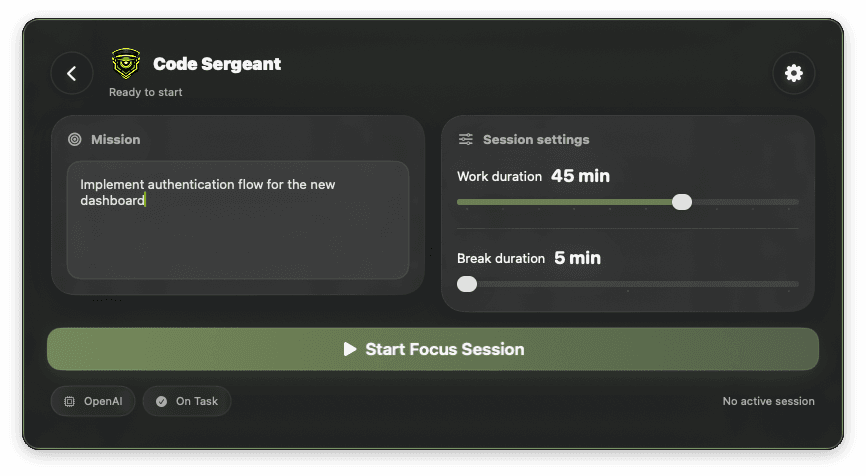
Code Sergeant idle state

Set The Objective

Lock in the block before you start drifting.

Set the objective, lock in the work block, and make the session explicit before you start. No vague timers. A stated mission the Sergeant can hold you to.

  • Objective written in plain language
  • Work-block timer with explicit commit
  • Sergeant voice profile selection
02 · Active Surveillance
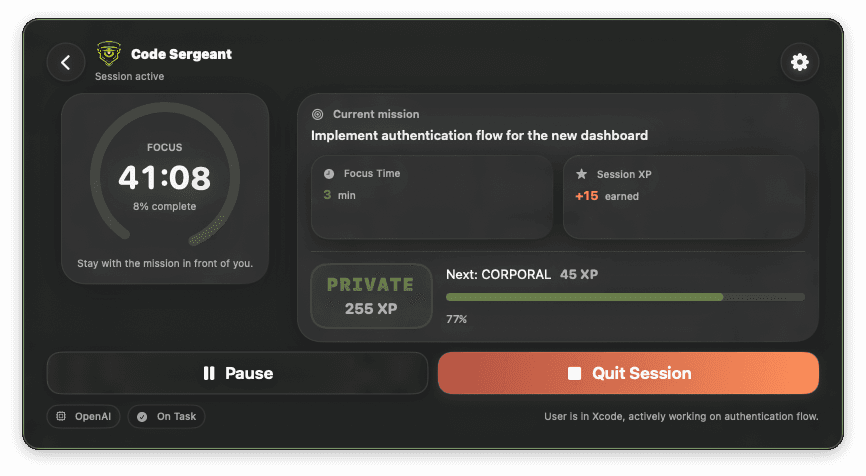
Active session view

During The Session

Tracked live, not just timed.

Every ~10 seconds, CodeSergeant asks a local LLM whether your current window is on-mission. A 30-second cooldown prevents nagging, and sustained off-task patterns escalate into a voice warning. On hard drift, a strobe overlay.

  • Window-title judgment via local Ollama (OpenAI optional)
  • Rolling pattern detection, not a one-frame fail
  • Cooldown-aware voice nudges and warning strobe
03 · Command Tuning
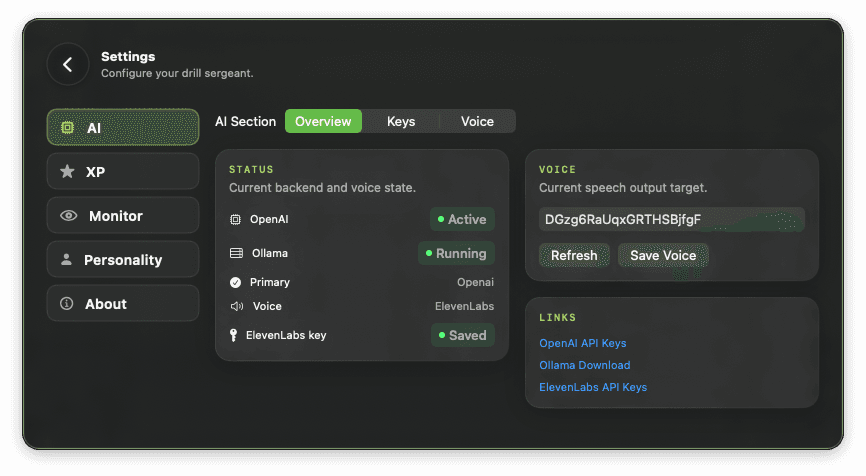
Settings panel

Tune The Sergeant

Pick the model, pick the attitude.

Pick the Ollama model, pick the personality, tune the Pomodoro and XP loop. Voice can stay on-device via macOS TTS, or you can wire an ElevenLabs key for a richer sergeant.

  • Local judgment by default · zero telemetry
  • Poll, judge, and cooldown intervals are configurable
  • Four personalities + custom profile, each with its own wake word
Session Loop

Pomodoro.
XP.
Voice Notes.

Sessions run on configurable Pomodoro cycles. Completing a block earns XP against a rank ladder. Voice features stay out of the way until you invoke them.

Loop 01 //

Pomodoro with voice transitions.

Configurable work and break durations. The Sergeant announces transitions so you never miss the start of a block.

POMODORO
Loop 02 //

XP and rank ladder.

Every completed focus block earns XP. Ranks climb with accumulated sessions. Visible, animated, and persistent.

XP-RANK
Loop 03 //

Hands-free voice.

“Hey Sergeant” to chat during a session. “Take note Sergeant” to capture a transcribed note without touching the keyboard. Music and browser audio duck while the Sergeant speaks.

WAKE-WORD
Voice Check

Meet the Sergeant.

Two TTS paths: Apple's on-device voices for a fully local setup, or an ElevenLabs API key for studio-grade delivery. Every line is written to read like an NCO who's watched you blow the last three sessions, not a polite assistant.

  • Four stock personalities plus a custom one, each with its own wake word
  • “Hey Sergeant” to chat, “Take note Sergeant” for hands-free notes
  • Music and browser audio duck so the Sergeant cuts through

voice-test://sergeant · channel 01

"Eyes on the objective, soldier. You said deep work. Act like it."

Mode DEMOVoice SERGEANTProvider ELEVENLABS
Testing Orders

Don't “try it.” Put it through a real work block.

The useful feedback comes from actually running a session that matters, not clicking around for five minutes.

Step 01

Run a real session

Pick a task you actually need to finish and let the app watch what happens when your attention starts to bend.

Step 02

Push the Sergeant

Try the voice, settings, and nudges hard enough to learn whether the tone motivates you or becomes noise.

Step 03

Report the misses

The useful feedback is where the app judged context wrong, interrupted at the wrong moment, or failed to apply pressure.

Field Manual

Straight answers.

Does Code Sergeant send anything to the cloud?

By default, context judgment runs on-device via Ollama and voice uses macOS's built-in TTS, with no cloud round-trip. If you add an ElevenLabs or OpenAI API key in Settings, those providers are called directly from your machine for voice and/or judgment. Nothing else is transmitted: no telemetry, no analytics pings.

How does it decide what counts as “drift”?

Every ~10 seconds it reads your frontmost app and window title via macOS Accessibility APIs, and asks a local LLM whether that matches your stated objective. A 30-second cooldown prevents nagging, and a rolling pattern detector escalates when drift sticks. Research-shaped work near the mission stays quiet.

What hardware do I need?

macOS 14 or newer on Apple Silicon (M1 or later). Ollama is optional but recommended for AI judgment. Without it, a rule-based fallback runs. ElevenLabs and OpenAI are optional and key-based. Intel Macs are not supported.

Can I change the voice?

Yes. Four stock personalities ship: Sergeant, Buddy, Advisor, and Coach. Each has its own wake word and phrase library. You can also define a Custom personality (name, wake word, tone) and paste an ElevenLabs voice ID to drive the sound.

Is this a timer app?

No. Timers don't judge what you're doing. Code Sergeant watches context against a stated mission and applies pressure when drift is real. A timer is a stopwatch; this is a drill sergeant.

Deployment

Give it an objective. See if it holds the line.

Download the beta, read the setup guide, and send feedback after you've tried to break your own focus with it.